Google Business Profile Optimization: Complete Guide for NZ 2026
Google Business Profile Optimization: Complete Guide for NZ 2026
Introduction
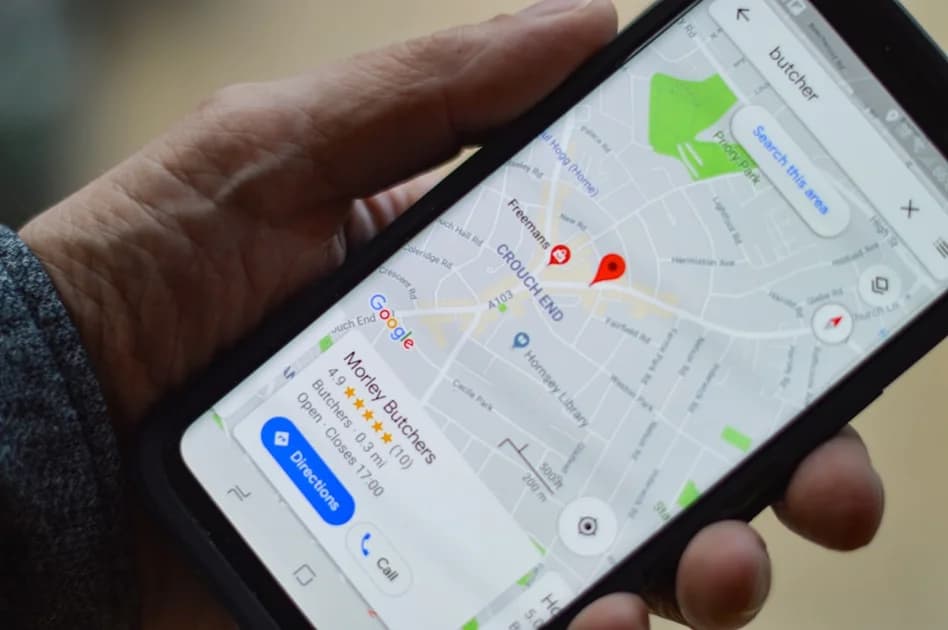
When Auckland customers search "plumber near me" or "best cafe Newmarket," one thing determines whether they find your business or your competitor: your Google Business Profile (GBP).
Your Google Business Profile is the single most powerful free marketing tool available to New Zealand small businesses. It controls your visibility in Google Maps, local search results, and the coveted "Local 3-Pack" that appears at the top of search results.
This comprehensive guide shows you exactly how to claim, optimize, and leverage your Google Business Profile to attract more local customers in 2026.
Why Google Business Profile Matters for NZ Businesses
Free Visibility in Local Search
Google Business Profile is completely free, yet delivers results that rival paid advertising. When optimized correctly, your business appears prominently when customers search for your services in Auckland or anywhere in New Zealand.
Dominates Mobile Search
With over 70% of NZ web traffic on mobile devices, local search is critical. Mobile users searching for services nearby are high-intent customers ready to buy, book, or visit your location.
The Local 3-Pack Advantage
The Local 3-Pack (the map listing with 3 businesses) receives 33% of all clicks from local searches. Appearing here means massive visibility, even above traditional organic results. Businesses not in the Local 3-Pack miss out on the majority of local traffic.
Builds Trust Through Reviews
Your Google Business Profile displays customer reviews prominently. Businesses with 40+ positive reviews see a significant trust boost and higher conversion rates.
Direct Customer Actions
GBP includes click-to-call buttons, direction links, and booking integrations. Customers can contact you without ever visiting your website, reducing friction and increasing conversions.
Step 1: Claim and Verify Your Google Business Profile
Find and Claim Your Listing
Many businesses already have a Google listing created automatically through Google's aggregation of business data. First, check if your business already exists.
- Visit google.com/business
- Click "Manage now"
- Search for your business name and address
- If found, click "Claim this business"
- If not found, click "Add your business to Google"
Verification Methods
Google requires verification to prevent spam and ensure accuracy. Verification methods include:
Postcard Verification (Most Common):
- Google mails a postcard with verification code to your business address
- Arrives within 5-14 days
- Enter the code in your GBP dashboard
- Most reliable method
Phone Verification (Some Businesses):
- Receive verification code via automated call or SMS
- Instant verification
- Available for established businesses in certain categories
Email Verification (Rare):
- Verification link sent to domain email address
- Available only for businesses already verified through Google Search Console
Video Verification (New in 2026):
- Record video tour showing business signage and interior
- Required for some categories to prevent fake listings
- Reviewed within 3-5 business days
Complete verification within 14 days to avoid losing your listing claim.
Step 2: Complete Your Profile 100%
Why Completeness Matters
Google rewards complete profiles with better visibility. Businesses with 100% complete profiles appear 2.7x more often in local search results. Incomplete profiles signal low quality and get buried.
Business Name
Use your exact legal business name as it appears on your signage, business registration, and website. Do not stuff keywords.
Wrong: "Best Auckland Plumber - Emergency Plumbing Services 24/7" Right: "Smith Plumbing Services"
Keyword stuffing violates Google's guidelines and can result in suspension.
Business Category
Choose your primary category carefully - it determines which searches your business appears in.
- Select the most specific category available
- Example: "Plumber" not "Contractor"
- Add up to 9 secondary categories for additional services
- Examples: "Emergency Plumber," "Gas Fitter," "Drain Cleaning Service"
Address and Service Area
Physical Location Businesses:
- Enter your exact street address
- Include suite/unit numbers
- Must match your website and other listings exactly (NAP consistency)
Service Area Businesses (No Physical Location):
- Hide your address if customers don't visit your location
- Define service areas by city or postcode
- Example: "Serves Auckland, North Shore, Waitakere"
Phone Number
Use a local Auckland number, not a 0800 number, for better local trust. Ensure it's the same number listed on your website and other directories.
Website URL
Link to your homepage or a dedicated landing page optimized for local search. Ensure the website is mobile-friendly - Google checks.
Hours of Operation
List regular hours and special hours for holidays. Keep these updated - nothing frustrates customers more than showing up during listed hours to find you closed.
Enable "24 hours" or "Open late" badges if applicable - these appear in search results and attract customers searching outside standard business hours.
Business Description
You have 750 characters to describe your business. Use them wisely.
Description Best Practices:
- Start with what makes you unique
- Include primary and secondary keywords naturally
- Mention Auckland or specific suburbs you serve
- Highlight years in business, certifications, or specializations
- Avoid keyword stuffing - write for humans, not robots
Example for Auckland Plumber:
"Smith Plumbing Services has provided expert plumbing solutions to Auckland homes and businesses since 2015. We specialize in emergency plumbing, gas fitting, drain cleaning, and hot water cylinder installation. Our licensed plumbers serve the North Shore, Central Auckland, and East Auckland with fast response times and upfront pricing. Available 24/7 for plumbing emergencies."
Step 3: Add High-Quality Photos and Videos
Visual Content Drives Engagement
Businesses with photos receive 42% more direction requests and 35% more website clicks than those without. Visual content builds trust and shows customers what to expect.
Photo Requirements
- Format: JPG or PNG
- Size: Between 10KB and 5MB
- Resolution: Minimum 720px tall, 720px wide
- Quality: High resolution, well-lit, in focus
Essential Photo Types:
Exterior Photos:
- Storefront with signage visible
- Entrance/doorway
- Parking area
- Multiple angles of building
Interior Photos:
- Reception or service area
- Work environment
- Waiting areas
- Clean, well-lit spaces
Team Photos:
- Staff in uniform or professional attire
- Individual headshots of key team members
- Team photos showing professionalism
Work Examples:
- Before/after photos (plumbers, landscapers, builders)
- Completed projects
- Products on display
- Services being performed
Upload Frequency
Google rewards active profiles. Upload new photos monthly to signal that your business is active and engaged. Seasonal photos, new staff, or recent projects keep your profile fresh.
Videos (New Priority in 2026)
Google now prioritizes video content in Business Profiles. Videos receive 3x more engagement than static photos.
Video Ideas for Auckland Businesses:
- 30-second business intro tour
- Meet the team introductions
- Service demonstrations
- Customer testimonials
- Behind-the-scenes content
Keep videos under 30 seconds for maximum engagement. Upload in 720p or higher.
Step 4: Collect and Manage Google Reviews
Reviews Are the #1 Local Ranking Factor
After proximity and relevance, Google reviews are the most important factor determining local search rankings. Businesses with 40+ reviews rank significantly higher than those with fewer reviews.
How to Get More Reviews
Ask at the Right Time:
- After successful service completion
- When customers express satisfaction
- Via follow-up email 24-48 hours after service
Make It Easy:
- Create a short review link: g.page/yourbusiness/review
- Include in email signatures
- Add to invoices and receipts
- Display QR code in-store
Never Incentivize Reviews: Google strictly prohibits offering discounts, freebies, or incentives for reviews. Violating this results in review removal and potential profile suspension.
Review Response Strategy
Respond to every review - positive and negative. Google tracks response rate and speed, and uses this as a ranking signal.
Responding to Positive Reviews:
- Thank the customer by name
- Mention specific details from their review
- Invite them back
- Keep responses genuine, not templated
Example: "Thanks for the kind words, Sarah! We're glad we could get your hot water cylinder replaced quickly. Looking forward to helping you again in the future."
Responding to Negative Reviews:
- Respond within 24 hours
- Acknowledge the issue without making excuses
- Offer to resolve offline (provide contact details)
- Stay professional and calm
Example: "We apologize for the delay you experienced, John. This isn't our usual standard. Please contact me directly at 09-XXX-XXXX so we can make this right."
Step 5: Use Google Posts for Regular Updates
What Are Google Posts?
Google Posts are short updates that appear directly in your Business Profile. They're like social media posts, but they appear in Google Search and Maps.
Post Types:
- Updates: General business news, announcements
- Offers: Special promotions, discounts (must include dates)
- Events: Upcoming events with date/time
- Products: Showcase specific products with pricing
Why Posts Matter
Posts keep your profile active and provide fresh content for potential customers. Active profiles with regular posts rank higher than dormant profiles.
Posting Strategy:
- Post 2-4 times per month minimum
- Include a call-to-action ("Book Now," "Call Today")
- Add high-quality images to every post
- Use offers strategically during slow periods
Example Post for Auckland Cafe:
"Winter Special: Enjoy 20% off our new seasonal soup menu all May. Warm up with locally-sourced pumpkin, kumara, or tomato basil. Visit us Monday-Friday for lunch."
Include: call-to-action button ("Order Now"), dates (May 1-31), appealing food photo.
Step 6: Monitor Insights and Optimize
Google Business Profile Insights
Your GBP dashboard provides detailed analytics showing how customers find and interact with your listing.
Key Metrics to Track:
How Customers Search:
- Direct searches (searched your business name)
- Discovery searches (searched category, e.g., "plumber Auckland")
- Higher discovery percentage = better SEO
Customer Actions:
- Website clicks
- Direction requests
- Phone calls
- Message button clicks
Photo Views:
- How often customers view your photos vs. competitors
- High photo engagement = better visibility
Use Insights to Improve:
- If discovery searches are low, optimize category and description
- If direction requests are high but calls are low, check your hours and phone number
- If photo views are low, upload more high-quality images
Common Mistakes to Avoid
Keyword Stuffing in Business Name
Google suspends profiles with keyword-stuffed names. Use only your legal business name.
Inconsistent NAP (Name, Address, Phone)
Your business name, address, and phone number must match exactly across your website, GBP, and all online directories. Inconsistencies confuse Google and hurt rankings.
Ignoring Reviews
Not responding to reviews signals low engagement. Respond to all reviews within 48 hours.
Selecting the Wrong Category
Your primary category determines which searches you appear in. Choose carefully based on your core service, not what you wish you did more of.
Neglecting Regular Updates
Dormant profiles lose visibility. Upload photos monthly and post updates regularly.
Advanced GBP Optimization for 2026
Google Business Profile Messaging
Enable messaging to allow customers to contact you directly through Google Search and Maps. Respond within 24 hours to maintain "responds quickly" badge.
Booking Integration
Integrate booking tools (Calendly, Booksy, SimplyBook.me) directly into your GBP. Customers can book appointments without leaving Google.
Product Catalog
Add your products or services with descriptions and pricing. Product listings appear in search results and drive conversions.
Q&A Section
Monitor the Questions & Answers section. Customers can ask questions publicly, and anyone can answer. Proactively add FAQs to control the narrative.
Attributes
Enable relevant attributes (e.g., "wheelchair accessible," "free Wi-Fi," "outdoor seating"). Attributes improve filtering and visibility for specific searches.
Integrating GBP with Your Website
Embed Your Google Map
Add your Google Business Profile map directly to your website's contact page. This reinforces NAP consistency and provides visual directions.
Link from Your Website
Add a "Review us on Google" link from your website footer or contact page using your short review URL.
Schema Markup
Implement LocalBusiness schema markup on your website to reinforce your GBP data. Google uses this to verify consistency.
For more on improving your website's local SEO, see our guide on Local SEO for Auckland Businesses.
Measuring Success
Track These KPIs Monthly:
- Total search views (how often your profile appears)
- Customer actions (calls, direction requests, website clicks)
- Review count and average rating
- Photo views compared to competitors
- Discovery vs. direct search ratio
Benchmarks for Auckland Businesses:
- 40+ reviews: Competitive
- 4.5+ star average: Excellent
- 50%+ discovery searches: Strong SEO
- 100+ monthly direction requests: High visibility
Conclusion
Your Google Business Profile is your most powerful free marketing asset. Auckland businesses that optimize their GBP properly dominate local search, attract more customers, and outperform competitors who neglect this critical tool.
Follow this guide to claim, verify, and optimize your profile. Upload quality photos monthly, collect reviews consistently, and post updates regularly. Within 3-6 months, you'll see measurable increases in calls, direction requests, and website traffic.
Need help optimizing your Google Business Profile and overall local SEO strategy? FastSite specializes in local SEO for Auckland businesses and can manage your GBP optimization end-to-end. Contact us for a free consultation.
FastSite Team
10 May 2026
Need help with your website?
FastSite builds fast, modern websites that are designed to convert and easy to manage.
Related Posts
More practical insights from the FastSite blog.

Complete SEO Checklist for New Zealand Small Business Websites
Search Engine Optimisation (SEO) can seem overwhelming for New Zealand small business owners. With algorithm updates, technical requirements, and hundreds of ranking factors, where do you even start?
Read More
Local SEO for Auckland Businesses: Dominate "Near Me" Searches in 2026
When Aucklanders need a service, they don't flip through the Yellow Pages anymore. They grab their smartphone and search "plumber near me," "hair salon Ponsonby," or "best electrician Auckland."
Read More